How to Select the Best Format for Engaging and Effective Tutorials
Key Steps for Strategic Planning of Your Tutorials

Thorough planning is essential when creating impactful video tutorials. A clearly articulated strategy ensures that your content encompasses all critical product features while also engaging your audience effectively. Start by defining specific objectives and systematically arranging your material. This structured approach facilitates smooth demonstrations, reducing interruptions and distractions, which in turn enhances viewer retention.
Consider the journey your viewers will take throughout the tutorial. Each segment should build upon the last, promoting a comprehensive understanding of the product. By foreseeing potential viewer questions and addressing them proactively, you enrich the learning experience, making it more valuable and encouraging further exploration of the product.
How Do Scripts Enhance Clarity in Your Tutorials?
Creating detailed scripts is vital for achieving clarity in your video tutorials. A well-organised script ensures a consistent pace, making certain that every crucial aspect of the product is thoroughly covered during filming. This method results in high-quality content that appeals to a broad audience seeking practical insights.
Scripts help organise your thoughts, particularly when discussing intricate features. By focusing on one topic at a time, you can present information in an easily digestible manner, allowing viewers to fully understand how to utilise the product effectively.
What Visual Style Best Resonates with Your Audience?
Selecting an appropriate visual style is crucial for meeting audience expectations and improving comprehension. Clean, well-organised layouts that effectively display product details can greatly enhance viewer understanding. Avoid clutter that could confuse viewers trying to follow each step in sequence.
Think about implementing consistent colour schemes and typography that reflect your brand identity. This strategy not only creates a cohesive look but also strengthens brand recognition. By prioritising clarity in your visual presentation, you offer a more seamless learning experience for your audience, making it easier for them to grasp the product’s features.
What Essential Tools and Equipment Do You Need for Your Tutorials?

How to Set Up Cameras and Lighting for Optimal Results
Selecting the right equipment is essential for producing professional-quality videos that effectively showcase products. Investing in a high-quality camera and suitable lighting setup can attract more viewers interested in detailed demonstrations of the highlighted item’s features and benefits. High-definition video quality significantly enhances the viewer’s experience.
Utilising softbox lights or ring lights can help eliminate shadows and ensure that your product is well-lit from all angles. This not only improves visual appeal but also accurately represents colours and textures, which can influence potential buyers’ decisions. A well-lit video can substantially increase viewer engagement.
How to Choose Software for Smooth Editing
Researching various recording programs is essential for creators seeking solutions that simplify the editing process and yield high-resolution output. Popular software options, including Camtasia, OBS Studio, and Adobe Premiere Pro, each offer unique features tailored to different needs, from basic screen recordings to more advanced editing capabilities.
Selecting the right software can streamline your workflow, allowing you to focus more on content creation rather than technical difficulties. Look for tools that feature user-friendly interfaces and robust support communities, enabling you to resolve issues quickly and effectively, ensuring your tutorials remain engaging and informative.
How Can You Achieve High-Quality Audio to Enhance Engagement?
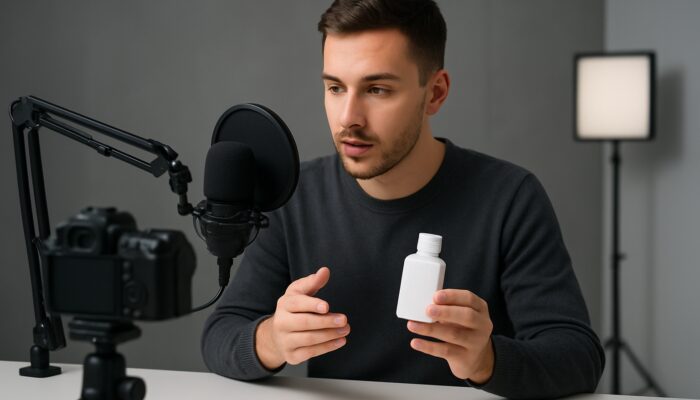
Clear audio recording is crucial for effective video tutorials. It prevents misunderstandings during explanations, ensuring your audience receives precise instructions on how to operate the product. Investing in a quality microphone can significantly enhance the overall experience, as poor audio quality often leads to viewer frustration and disengagement.
During the recording process, consider using pop filters and windshields to reduce background noise and improve voice clarity. Emphasising audio quality allows viewers to concentrate on the content without distractions, creating a more effective learning environment. Remember, sound quality is just as important as visual quality when producing engaging tutorials.
How to Implement Reliable Storage and Backup Solutions
Dependable storage devices are essential for safeguarding all recorded footage and edited videos. Using external hard drives and cloud storage solutions ensures that your content is securely backed up and readily accessible for future updates or uploads across multiple platforms. Data loss can pose significant challenges in the content creation process.
Establishing a systematic storage strategy, including regular backups, can save you time and stress in the long run. This allows you to focus on creating new content rather than worrying about lost files. A robust backup plan is a fundamental component of a successful video production workflow.
How Can Visuals Transform Product Demonstrations?
Utilising Effective Animation Techniques
Animations are powerful tools for highlighting specific functions and simplifying complex processes. By breaking down intricate tasks into clear, visual segments, viewers can replicate actions after completing the tutorial sequence. This method enhances comprehension and information retention.
Consider incorporating animations to emphasise key features or to illustrate concepts that may be challenging to convey verbally. This strategy not only makes the tutorial more engaging but also accommodates various learning styles, ensuring that visual learners can absorb information effectively and apply it in practice.
How to Achieve High-Quality Screen Captures
High-quality screen recordings are vital for accurately capturing every click and menu navigation. This technique provides step-by-step visual references that support learning without necessitating additional text explanations beyond spoken narration. Screen captures can significantly enhance the overall clarity of your demonstrations.
When employing screen capture, ensure that the resolution is sufficiently high to maintain clarity during playback. This attention to detail prevents viewers from missing critical information due to pixelation or blurriness. Effective screen capture techniques can elevate an ordinary tutorial into a dynamic learning experience.
What Advantages Come from Incorporating Visuals in Your Tutorials?
- Enhances understanding of complex concepts
- Maintains viewer interest
- Illustrates points dynamically
- Boosts information retention
- Caters to diverse learning styles
- Facilitates easier content navigation
Visual elements are crucial for sustaining engagement throughout longer videos. By dynamically illustrating points rather than relying solely on verbal descriptions, you create a more compelling narrative that keeps viewers invested in the content. This approach not only boosts understanding but also encourages viewers to explore the product further.
Expert Recommendations for Crafting Video Tutorials on Product Demonstrations
Professional Insights on Optimal Lighting Techniques
Effective lighting is vital for accurately showcasing product textures and colours. Successful tutorials typically feature products in well-lit environments that highlight their attributes. For instance, technology gadgets benefit from soft, diffused lighting that minimises glare and shadows, allowing viewers to appreciate details that influence their purchasing decisions.
Real-life examples, such as makeup tutorials or cooking demonstrations, illustrate how effective lighting can enhance the viewer’s experience. By prioritising lighting setups that accurately reflect the product, creators can significantly improve viewer satisfaction and overall usability, leading to higher conversion rates.
Practical Steps for Effective Scripting
Experts recommend breaking scripts into concise segments that focus on one feature at a time. This approach promotes natural delivery and allows for easier revisions based on feedback gathered from test audiences during production. Short, focused segments help sustain viewer engagement and facilitate better understanding.
Incorporating audience feedback into your scripting process can also yield more relevant and effective tutorials. By understanding what resonates with your viewers, you can tailor your content to better meet their needs, resulting in a more successful tutorial that drives engagement and satisfaction.
Best Practices for Tool Integration
Effectively combining multiple tools requires testing their compatibility first. This step is crucial to avoid technical issues that could disrupt workflow and compromise the professional appearance of the final demonstration video. Ensuring your tools work seamlessly together can save time and enhance overall production quality.
Consider using tools known for their integration capabilities, such as OBS Studio for recording and Adobe Premiere for editing. This strategy not only streamlines your workflow but also allows you to concentrate on creating high-quality content without the stress of technical complications.
Which Equipment Yields the Best Results for Demos?
Evaluating Different Microphone Options
Various microphones can significantly influence voice clarity during narration. Testing different options ensures that the selected device delivers clear audio that complements visual elements without introducing background noise or distortion. Investing in a good microphone offers substantial benefits in viewer satisfaction.
Consider using lavalier microphones for hands-free recording or shotgun microphones for focused audio capture. Each type has its advantages, and selecting the right one based on your recording environment can enhance the overall audio quality of your tutorials, making them more enjoyable for viewers.
Ensuring Stability with Tripods
A stable support system is essential to prevent camera shake and maintain focus on the product throughout recording. A reliable tripod facilitates smooth transitions between angles, effectively showcasing various features from multiple perspectives. This stability is crucial for achieving a professional appearance in your videos.
When selecting a tripod, consider factors such as height adjustability and weight capacity. A well-chosen tripod can greatly enhance the quality of your recordings, allowing you to capture the desired shots while maintaining stability and clarity.
What Benefits Come from Investing in Quality Equipment?
- Reduces time spent in post-production
- Elevates overall video quality
- Boosts viewer engagement
- Improves audio and visual clarity
- Streamlines editing processes
Reliable equipment is transformative in video production. High-quality gear enhances the overall appearance and feel of your tutorials, making the editing process more efficient. This can lead to more appealing tutorials that resonate with potential customers researching products online.
Proven Strategies for Crafting Effective Video Tutorials for Product Demonstrations
Incorporating Real-World Examples to Enhance Pacing
Timing each segment of your tutorial is crucial for maintaining viewer engagement. Real-world examples illustrate how effective pacing can improve understanding and prevent glossing over significant details. By structuring your content to allow for pauses and emphasis, you create a more digestible learning experience.
Consider using visual markers or on-screen prompts to guide viewers throughout the tutorial. This approach not only keeps the audience engaged but also reinforces key points, ensuring that critical information is communicated clearly and retained during the demonstration.
Expert Recommendations on Editing Flows
Organising clips logically is essential for progressively building knowledge. Experienced creators suggest structuring your editing flow to ensure audiences can follow along without losing context or interest during longer tutorial sessions. A well-edited video can significantly enhance viewer retention.
Utilising visual cues, such as text overlays or transitions, can help reinforce the narrative and guide viewers through complex topics. By maintaining a clear flow, you enhance the overall learning experience, making it easier for viewers to understand the product’s functionalities.
How to Effectively Test Your Strategies
Regularly reviewing audience feedback is vital for refining your methods. Analysing which strategies yield the highest engagement and completion rates across various product types enables you to adapt your content effectively. This data-driven approach helps you make informed decisions about future tutorials.
Utilise analytics tools to monitor viewer behaviour and gather insights into what resonates with your audience. By understanding their preferences, you can continuously enhance your content, ensuring it remains relevant and captivating for your target demographic.
How to Integrate Interactive Q&A Segments
Incorporating opportunities for real-time questions during product demo videos fosters a deeper understanding and connection with the material presented. This approach not only clarifies doubts but also boosts overall engagement levels, resulting in higher completion rates across various audience segments. Interactivity can significantly enhance viewer satisfaction.
Consider using live streaming platforms or interactive video tools that allow viewers to submit questions during the tutorial. This not only creates a more engaging experience but also positions you as a responsive creator who values audience input, further building trust and loyalty.
How to Prioritise SEO-Friendly Scripting
Crafting scripts that incorporate relevant keywords and maintain clear structures enhances the discoverability of tutorial videos. By ensuring potential users can easily find valuable content, you improve their learning experience while expanding your reach. SEO-friendly scripting is a vital aspect of modern video marketing.
Integrate keywords naturally throughout your script while maintaining a conversational tone. This balance ensures your content is both engaging and optimised for search engines, helping you attract a larger audience eager to learn about the product features you’re showcasing.
What Metrics Should You Use to Assess the Effectiveness of Your Tutorials?
Why Is Tracking Viewer Retention Rates Important?
Monitoring watch times reveals which segments engage viewers most effectively. By analysing viewer retention rates, you can identify areas for improvement, allowing you to make necessary adjustments that enhance future tutorials. Understanding viewer behaviour is essential for creating more effective content.
Utilise analytics tools to pinpoint when viewers drop off during your videos. This data provides valuable insights into which parts of your tutorial may be too lengthy or unclear, enabling you to refine your approach and boost viewer engagement in future releases.
How to Collect Valuable Feedback from Your Audience
Gathering comments and survey responses offers insights into viewer needs and highlights areas in need of improvement. This feedback loop is critical for enhancing content clarity and presentation style across successive video releases. Engaging with your audience can lead to a more tailored and effective tutorial experience.
Consider implementing post-video surveys or encouraging comments to collect actionable feedback. By actively seeking viewer input, you demonstrate a commitment to quality and responsiveness, which can enhance viewer loyalty and increase the likelihood of repeat views.
What Are the Benefits of Measuring Your Results?
- Facilitates better decision-making
- Enhances resource allocation
- Aligns tutorials with audience preferences
- Improves content quality over time
- Increases viewer satisfaction
Data-driven evaluations are essential for optimising your video tutorials. By measuring results, you can make informed decisions about future projects, ensuring your content aligns closely with audience preferences and learning objectives. This proactive approach leads to continuous improvement and greater viewer engagement.
Final Steps for Publishing Your Video Tutorial
Best Practices for Cuts and Transitions
Smooth edits are fundamental for maintaining a professional flow in your video tutorials. By removing errors and unnecessary segments, you can produce a polished final product ready for distribution. This attention to detail can significantly enhance viewer perception of your content.
Use transitions thoughtfully to guide viewers from one segment to another. Well-placed cuts and transitions improve narrative flow, making it easier for viewers to follow along and retain key information. A seamless editing process can elevate the overall quality of your tutorials.
Adhering to Platform-Specific Upload Requirements
Following platform guidelines is crucial for ensuring videos display correctly across various devices. Adhering to specifications for format, resolution, and aspect ratio helps you reach your target audience without technical barriers that could hinder accessibility or impact engagement. Each platform has distinct criteria.
Before uploading, ensure your video meets the specifications of platforms like YouTube, Vimeo, or social media sites. This attention to detail guarantees that your content is accessible to a broader audience, maximising its reach and impact in a competitive online landscape.
How to Design Eye-Catching Thumbnail Images
Attention-grabbing thumbnails are essential for encouraging clicks on your video tutorials. A well-crafted thumbnail visually summarises the content and sparks curiosity about the product features discussed in the tutorial. This first impression can significantly influence whether viewers choose to engage with your content.
Utilise bold colours, clear text, and relevant imagery to create striking thumbnails that stand out in crowded feeds. An engaging thumbnail can entice viewers to click and explore your tutorial, ultimately increasing your video’s reach and potential impact.
Frequently Asked Questions
What is the Ideal Format for Video Tutorials?
The best format for video tutorials typically comprises a clear structure that includes an introduction, main content, and a conclusion. It should engage viewers through visual elements and narration, ensuring that key points are effectively highlighted.
What Is the Recommended Duration for a Video Tutorial?
Video tutorials should ideally last between 5 to 15 minutes. This timeframe allows for comprehensive topic coverage while retaining viewer engagement without overwhelming them with excessive information.
What Equipment Is Necessary for Producing Video Tutorials?
Key equipment includes a high-quality camera, microphone, tripod, and lighting setup. Screen capture software and video editing tools are also crucial for creating polished tutorials that effectively convey information.
How Can I Enhance Audio Quality in My Videos?
To improve audio quality, invest in a high-quality microphone, minimise background noise, and consider using pop filters. Recording in a quiet environment and monitoring audio levels can also enhance clarity.
Which Software Is Best Suited for Editing Video Tutorials?
Popular software options for editing video tutorials include Adobe Premiere Pro, Final Cut Pro, and Camtasia. Each offers unique features, so select one that aligns with your editing needs and expertise.
How Can I Evaluate the Success of My Video Tutorials?
Success can be assessed through viewer retention rates, engagement metrics, and feedback collection. Analysing these factors helps refine future content and enhance overall effectiveness.
Should I Include Animations in My Tutorials?
Yes, animations can enhance understanding by visually breaking down complex processes. They make tutorials more engaging and assist viewers in grasping key concepts more easily.
What Tips Do You Recommend for Scripting Video Tutorials?
While scripting, keep segments brief and focused on one feature at a time. Use clear language and incorporate audience feedback to refine your approach and ensure relevance.
How Can I Create More Appealing Thumbnails?
To enhance thumbnail appeal, use bold colours, clear text, and relevant images. Ensure they are visually striking to attract attention and encourage viewers to click on your content.
What Advantages Come with Using High-Quality Equipment?
Quality equipment enhances video clarity, reduces post-production time, and elevates overall production value. This leads to more engaging tutorials that resonate with viewers and increase their likelihood of making a purchase.
Explore our X profile for more insights!
The Article Creating Video Tutorials for Product Demos: Essential Tips was first published on https://marketing-tutor.com
The Article Video Tutorials for Product Demos: Key Tips You Need Was Found On https://limitsofstrategy.com
The Article Product Demo Video Tutorials: Essential Tips to Know found first on https://electroquench.com